Petrinex Authentication Changes Project
General Questions 1. Why do we have to change how we sign in to Petrinex? Petrinex is updating its user authentication process as part of a broader Government of Alberta initiative to standardize how individuals and organizations sign in to online services, Petrinex is transitioning to Alberta.ca Account. This change supports a simpler, more consistent experience across government services and enables the retirement of legacy, service-specific authentication methods. As a result we are using the Alberta.ca Account for Organizations process for authentication when signing into Petrinex by verifying identity (e.g., "who are you?") relying on the user's e-mail address.
User Security Administrator / AAO Administrator Questions
1. Since we are creating users in our Alberta Account for Organizations (AAO) account, do I still need to create users in Petrinex? There are no changes to the Primary USA and Backup USA accountabilities in Petrinex. These roles continue to manage user access for each BA, so USAs must still create and maintain users directly in Petrinex. When you set up users under your organization’s AAO account, you verify their identity and confirm that they are permitted Petrinex users. This step allows them to log in. When you set up users in Petrinex as a USA, you assign their roles. These roles determine what each user can access after they authenticate and log in. As a result, Primary USAs and Backup USAs remain responsible for:
- Managing User roles
- Managing User ID and Access
- Managing the Designate BA Relationship
2. As AAO Administrator, how do I approve a request to join our AAO account? - From your browser, type https://account.alberta.ca/ui/sign-in/create-new-business-account to open “Create Account" screen.
- Click sign-in beside “Already have an Alberta.ca Account".
- Select the “eye" symbol beside the organization role of Admin.
- Select Staff Accounts tab.
- New user requests "Pending". Click "View Request" link.
- Approve or Reject as applicable.
BA User Questions1. Why can't I access Petrinex after I set up my account and join an AAO Account? - If you receive a notification to contact your administrator: When you create your personal account and request to join an AAO account, there may be a short delay before you can sign in. Your AAO Administrator (your company’s User Security Administrator) must approve your request before you can access Petrinex. If your administrator confirms that your account has been approved and you still cannot sign in, contact the Alberta.ca Support Team at alberta-ca.account@gov.ab.ca or 1‑844‑643‑2789 for assistance.
- If you receive a notification to contact your User Security Administrator: This means there is a mismatch in your first name, last name, or email address between the AAO account and Petrinex. Your USA will need to update the information so the systems match.
2. I thought I read that there were no passwords anymore, yet I had to create one. Petrinex USAs will no longer manage or reset user passwords in Petrinex once the transition to AAO has been completed. You are required to enter the password you created in AAO when you sign in. End users are responsible for managing their password in AAO. There is a reset password process in AAO where you can change your password. 3. Why does my personal Alberta.ca account display when I sign in to AAO? I don't want it linked to my business profile. If you sign in with your business email on the Alberta.ca Account for Organization screen, you should not see your personal Alberta.ca account. If you instead try to sign in through the Alberta.ca login screen, you will see your personal Alberta.ca account listed. However, you would have to actively select it to open it, and it is not connected to Petrinex in any way. Petrinex does not accept personal Alberta.ca accounts for authentication. Only organizational Alberta.ca accounts can be used to access Petrinex. 4. When I am creating my account to "join" a AAO account, I see multiple AAO accounts for my organization from which to choose. How will I know that I am selecting the proper one? If you are unsure which AAO Account to select and don't know the Admin listed, contact your USA for confirmation of the correct AAO account selection, including the AAO account identifier (B.xxxxx) 5. If I work for multiple companies, and each company has set up an AAO account, how do I sign in? As an industry user, use the AAO sign-in link (the one with the Petrinex logo) and enter your e-mail address and, if required enter the password that you set up at the time you created your account. If you have been set up under different companies, you can "switch" which account to use. Important: the authentication process relies on your e-mail address: If your user e-mail is the same for the companies listed, when you select one you will have access to "switch" between accounts by clicking on your username at the top-right hand corner.
If your user e-mail is different for a specific company BA, you will only have access to that BA in Petrinex when you authenticate through AAO using that e-mail address. If any of your accounts appear to be missing, please contact the primary USA for those BAs to confirm if your first name, last name and e-mail address match the information set-up in the AAO account.
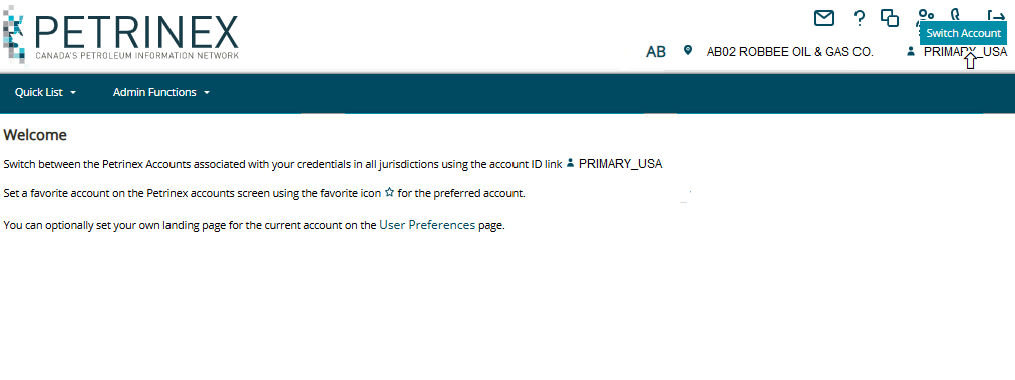
6. How do I "switch" between different BA accounts when I'm logged into Petrinex?
With this new sign-in, functionality has been added to Petrinex to allow
users with more than one BA to switch between different BA accounts in multiple jurisdictions.
From your profile, click on your user name in the top-right hand side of the banner, to display a “switch' button, click on the username to be directed to your approved BA Accounts.
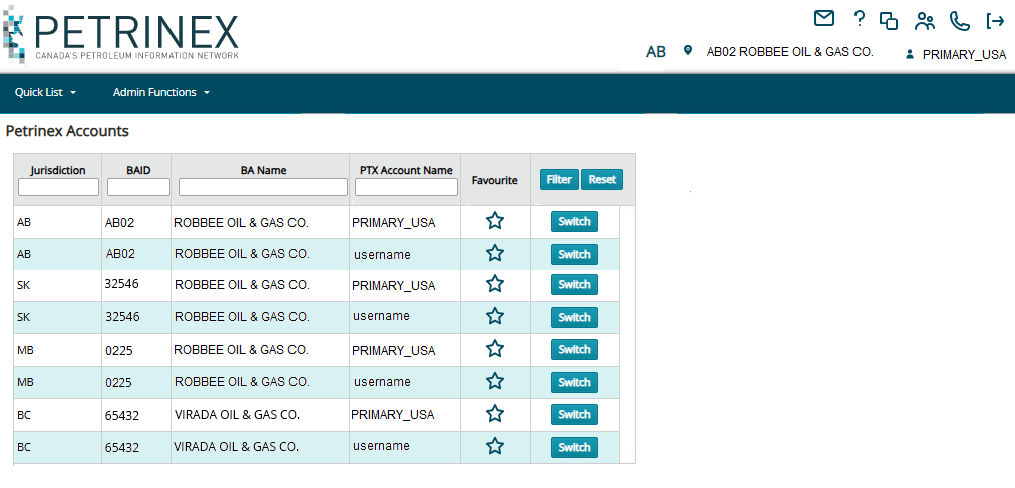
Click the "favourite" flag (star) to select the BA that you would like Petrinex to open to each time you sign in.
| 